Save any ad you see in one click.
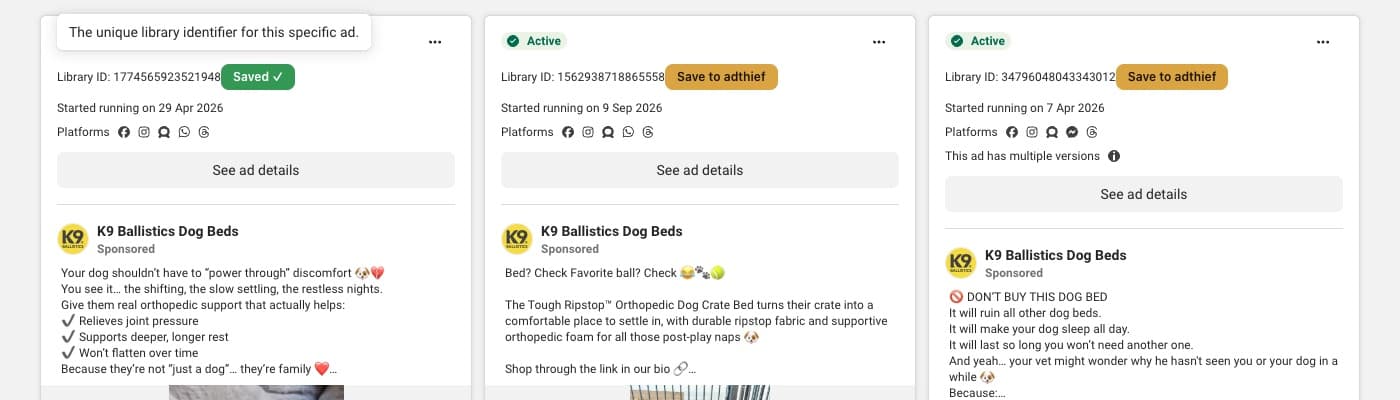
A Save to adthief button on every ad in Meta’s Ad Library and on sponsored posts in your Facebook and Instagram feeds. It lands in your swipe file with its image or video, its text and how long it has run.
For Chrome · free · 12 KB
Install it in two minutes
- 01
Download and unzip
Get adthief-extension.zip and double-click it. Keep the folder somewhere permanent, like Documents.
- 02
Load it into Chrome
Open
chrome://extensions, turn on Developer mode (top right), press Load unpacked and pick the folder. Pin the adthief icon from the 🧩 menu. - 03
Connect your account
In adthief.ai go to Account → Chrome extension, press Make a key, then paste it in the extension’s popup.
- 04
Save winning ads
Open Meta’s Ad Library, search, and press Save to adthief under any ad.
Questions
Is it free?
Yes, like adthief.ai while it is in beta.
What does it save?
The ad as the Ad Library shows it: the brand, the image or video, the text, the headline, the start date and the platforms. Images and videos are copied to adthief.ai at once, because Meta’s links expire.
Where does it work?
On Meta’s Ad Library (every country, any language), and on sponsored posts in your Facebook and Instagram feeds while you scroll. From a feed we find the same ad in the Ad Library for its full video; if it isn’t there, it is kept as you saw it. TikTok, LinkedIn and X are next.
What can it see?
Only ads: the Ad Library’s ads and the posts marked as ads in your feeds, and only the one you save. It doesn’t read your friends’ posts, your messages or your account, and it only talks to adthief.ai.
Why Developer mode?
Until it is listed in the Chrome Web Store, Chrome installs it from the folder. That is why Chrome may remind you it is in Developer mode; it is safe to keep it on.